
When I built CUTTKR, I wanted to see where each edit stood without having to piece it together from filenames and notes. That works well when there’s one cut. If a job has a main video and a few shorter edits, I still want to see them together. But I also want to know which one is ready to go and which one needs another pass. Putting them all under one status makes that harder to see.
That’s what Project Groups are for. They let me keep the edits for the same campaign together while tracking each one separately. The November 14 update makes it easier to back out of creating a group or take an existing edit out of one. Neither change needs to interrupt the rest of what you’re doing in the edit form.
One campaign can have several edits
Say there’s a main video for a launch and a shorter cut for social. The main video is approved, but the social cut still needs a different opening and hasn’t gone out for review. I’d put both in the same Project Group. That tells me they belong together without making the social cut look any closer to done than it is.
I’d keep the launch date or a messaging note that applies to both in the group notes. If the note is about the new opening in the short cut, I’d put it on that edit. When you come back to the short cut, it helps to see both what the campaign needs and what you still have to do on that particular video.
A revised export of that same short cut is different. If it’s the next pass on the same deliverable, I’d track it as another version instead of starting another edit. A separate edit makes sense when it has its own review or delivery to keep track of. If there’s no separate job to follow, another entry is just one more thing to keep up with.
I’d leave a one-off edit ungrouped. If another deliverable gets added later, there’s a reason to connect them then. The useful test for me is whether opening the group tells me something I wouldn’t see from the cut alone, like which other edits are part of the same handoff.
Let me change my mind without starting over
Sometimes you don’t know where a cut belongs when you first add it. You might start a new group, then realize there’s already one for the campaign. Or you might decide to leave the edit on its own until you know which other cuts are happening. I don’t want that decision to get in the way of putting the work on the list.
In New edit or Duplicate, the group section now has its own Cancel button. It closes the group setup and restores the previous selection without closing the edit form. That still works after you click Done in the group section, as long as you haven’t saved the edit. The rest of what you entered is still there.
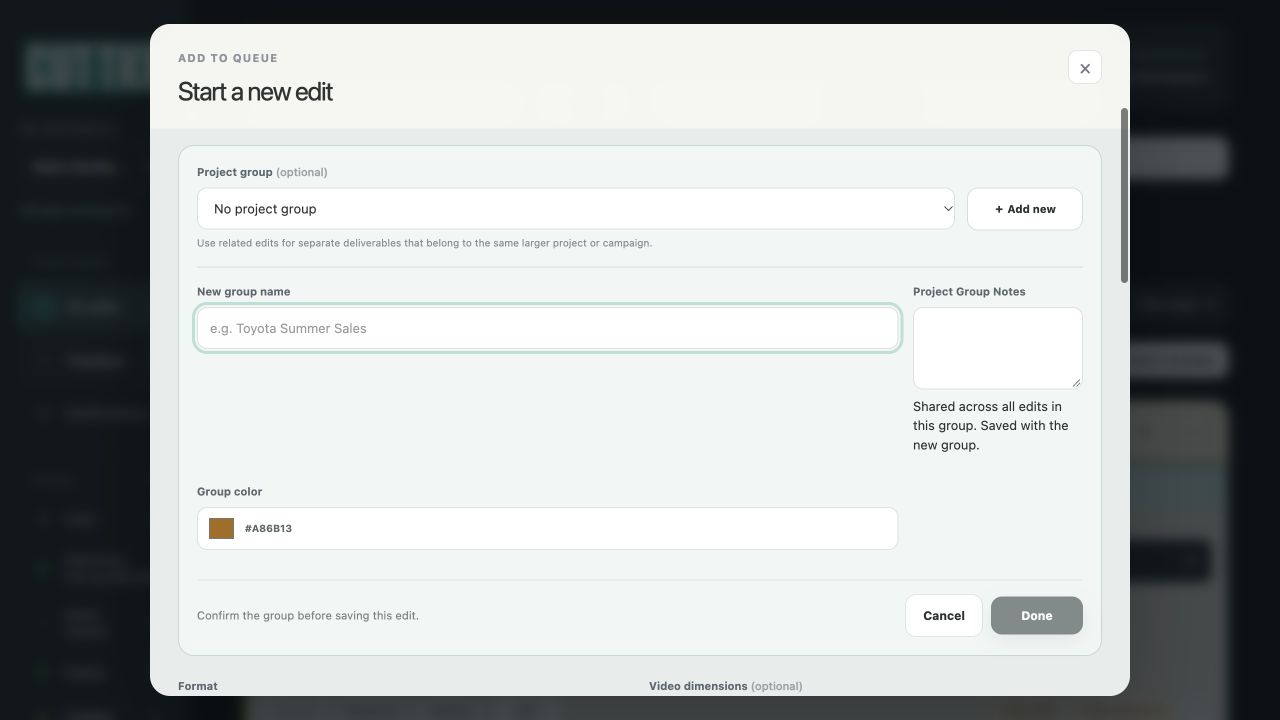
That distinction matters because I can be halfway through filling out an edit when I change my mind about the group. Maybe I’ve already put in a deadline and made a note about the version I’m starting from. I should be able to change the group without reentering those details.
Taking a cut out of a group isn’t deleting it
The other change is in Edit. If a cut no longer belongs with the others, choose Remove from group and save the change. If you click it by mistake, Undo removal is right there until you save. Removing it takes that edit and its alternate cuts out of the group. The other edits and the shared notes stay where they are.
That’s useful when the scope changes. Say one of the shorter cuts turns into a standalone piece with its own brief. I’d want it out of the old group so it doesn’t look like part of the same delivery. I’d still want the edit itself on my list. The group describes how the work fits together right now. It doesn’t have to be permanent.
A lot of my editing and motion design work involves different cuts of the same idea. Sometimes it’s enough to keep them all together. Other times I need to see exactly which cut has feedback and which one still has to go out. I’m building CUTTKR to leave room for both without making me decide everything up front.