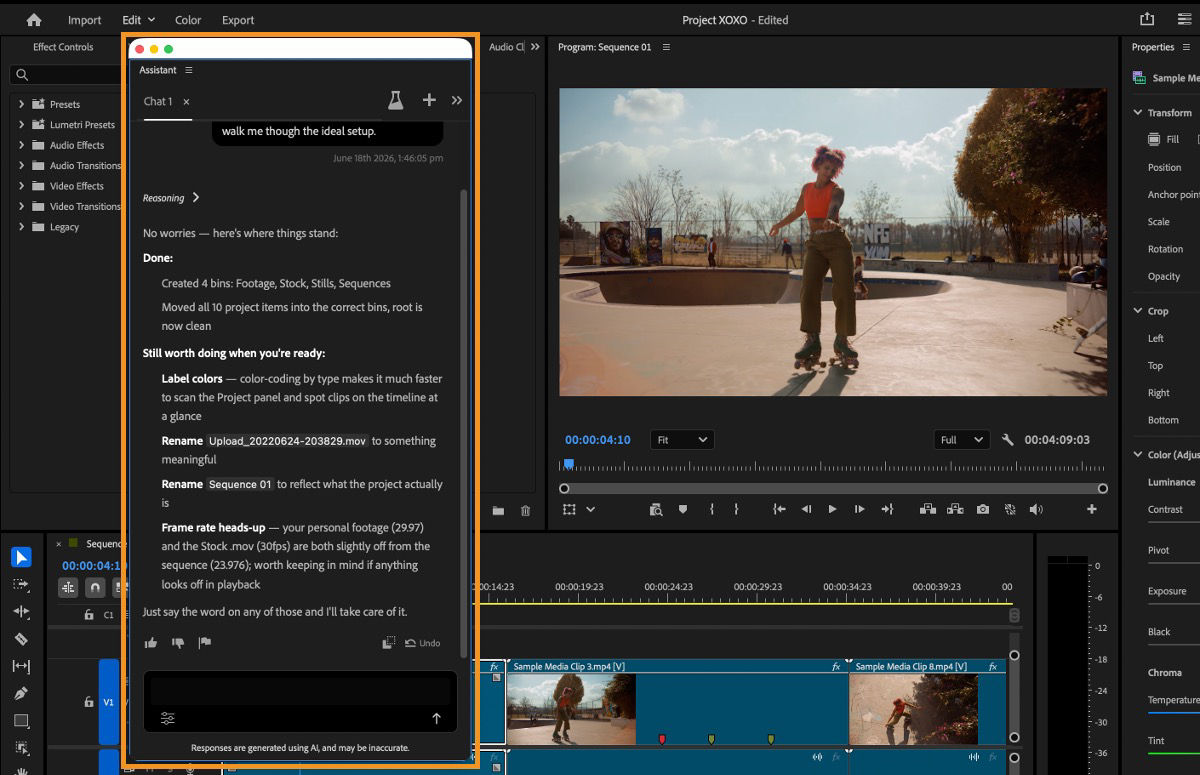
Adobe has introduced an AI Assistant inside Premiere as a public beta and says a related assistant is in private beta for After Effects. The important part is not another chat box. Adobe describes it as an agent that can interpret a request, choose Premiere tools, and carry out multiple steps directly inside an existing project.
In Premiere today, Adobe says the assistant can organize bins, rename and label clips, generate transcripts, detect slates, add markers, build stringouts, and assemble a rough starting point. Everything remains editable and appears in Premiere’s Undo and History panels. This is my professional reading of those capabilities, not a hands-on review.
The best first job is the work around the edit
Organizing footage is essential, but it is rarely the part of editing that makes the finished piece memorable. A clean project, useful labels, searchable transcripts, and a sensible stringout create the conditions for better decisions. They also consume time before the real shaping of the story begins.
If the assistant can reliably turn a pile of media into a consistent starting structure, that could be valuable. The editor still needs to decide what matters, recognize the strongest performance, find the pacing, and understand what the audience needs. The useful handoff is setup, not authorship.
An assistant can prepare the timeline. It cannot decide why a moment deserves to stay.
A rough assembly is not a finished edit
Adobe says the assistant can identify interview questions and build a first cut or stringout from project media. That can make review faster, especially when there are long interviews or many takes. It does not remove the editorial problem hiding inside the footage.
A transcript can identify words, but a strong edit also reads pauses, expressions, hesitation, emphasis, and the relationship between what is said and what is shown. Two answers can communicate the same fact while only one carries the right tone. The first assembly is where the material becomes visible. The finished edit is where experience turns that material into intention.
Control and visibility are the right design choices
The Premiere beta exposes the assistant’s reasoning, planned steps, tools, and models. Editors can require permission or let trusted tasks run automatically. Conversations are saved, and every action can be undone. That is better than an invisible process that returns a locked result.
I would begin with permission required and narrowly defined prompts. Organize selected interview clips into bins. Add markers for slate information. Build a stringout in a new sequence. Then review the result before asking for more. The goal is to make the assistant’s work easy to audit and easy to discard.
The beta label needs to be taken seriously
Adobe recommends duplicate or fresh test projects and says the assistant is not yet recommended for client work. Versioning, cutdowns, and context from scripts or production notes are not available today.
That makes the safe test case clear: copied media, a duplicate project, and work that can be rebuilt without risk. I would not let an early beta reorganize the only copy of a live project under deadline.
Privacy and model choice still belong in the decision
Adobe says user content is not used to train generative AI models. It also says some assistant tools run locally while others require media to be sent to the cloud for reasoning. That distinction matters for unreleased campaigns, confidential interviews, healthcare content, political work, or anything governed by a client agreement.
The assistant may use Firefly or partner models for generative tasks. Adobe considers Firefly output safe for commercial use, while users remain responsible for partner-model output. A professional workflow still needs to confirm which model ran, what was sent to it, and what the project permits.
After Effects is the more interesting open question
Adobe has announced AI Assistant for After Effects only as a private beta, without the same detailed public capability list available for Premiere. Anything more specific would be speculation. Still, the direction is worth watching because motion-design projects contain plenty of repetitive production work: organizing layers, checking comps, updating versions, preparing deliverables, and tracing where a change needs to happen.
My hope is that the assistant reduces mechanical work without flattening the craft. Good motion design depends on timing, spacing, composition, hierarchy, rhythm, and knowing when movement should stop. Those decisions are the work.
Experience becomes more important, not less
A tool that can execute several steps from one instruction raises the value of giving a precise instruction and recognizing a bad result quickly. Faster execution does not guarantee a clearer story, better pacing, cleaner motion, accurate versions, or a reliable delivery. It only reaches the review point sooner.
That is why I see Adobe’s assistant as potentially useful production support, not an editor or motion designer. If it gives experienced creatives more time for judgment, refinement, sound, animation, finishing, and quality control, it solves a real problem. If it encourages teams to skip those parts, it only makes unfinished work faster.
You can see how I carry projects through senior editing, motion design, sound, finishing, and final delivery in my selected work.