
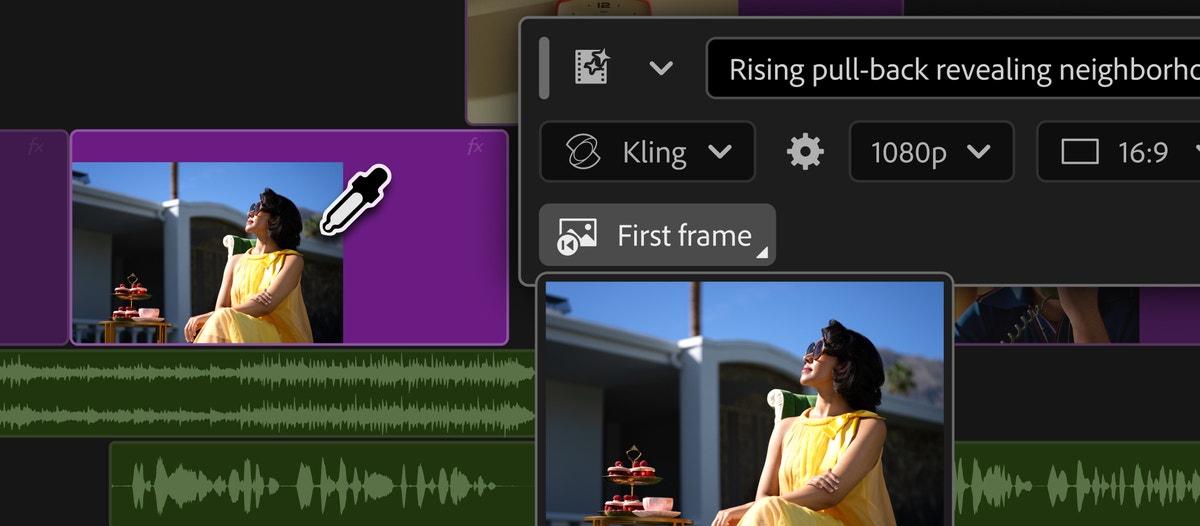
Adobe released Premiere 26.5 this week with a feature that changes where generative media enters the editing process. The new Generative Media Tool can create video and sound effects directly in the timeline. Editors select a range, describe what they need, choose a supported model, and receive an editable clip inside the sequence.
The same release also adds Paper Edit, which can build a sequence from selected transcript lines. Adobe’s broader September announcement includes beta tools for generated music and soundscapes, audio cleanup, overlapping-speaker separation, and an AI Assistant in After Effects.
The headline is generation. My professional read is that the more important shift is context. These tools are moving closer to the exact frame, gap, transcript, and audio problem an editor is trying to solve.
Putting generation on the timeline makes iteration faster. It does not make every generated answer right for the story.
The timeline gives the prompt editorial context
Adobe’s documentation says an editor can drag across the timeline to define where new media should appear, use first and last frames as references, choose settings such as aspect ratio and frame rate, and review estimated generative-credit usage before creating the clip. Depending on the model, generated audio can arrive with the video.
That is more useful than generating a disconnected clip and forcing it into the edit later. The surrounding sequence already establishes duration, composition, rhythm, and the shots on either side. Reference frames can give the model a visual starting point. The result also lands where the problem exists, so it can be judged immediately against the cut.
But context is not intent. A generated bridge may cover a transition while introducing a continuity problem, changing a product detail, weakening a performance, or creating a visual that does not belong to the approved campaign. The timeline makes comparison easier; the editor still has to notice what changed.
Generated audio may be the quieter practical win
Premiere can generate sound effects from text, synchronize them to visible action, or use a recorded guide to shape timing and intensity. Beta options can also generate music with tempo and loop controls, or analyze a short section of video to build a starting soundscape.
Those tools could be valuable when an edit needs a specific texture, transition, impact, or ambient layer that is difficult to locate in a library. They also create a new finishing responsibility. Generated audio still needs to be edited, balanced, checked against dialogue, reviewed for repetition or artifacts, and mixed for the actual delivery specifications.
A sound arriving at the right frame is not the same as a finished mix. It is material for the editor and sound team to shape.
Paper Edit may save more time than the flashier feature
Paper Edit lets editors select multiple lines in a transcript and turn them into a sequence. For interviews, testimonials, explainers, and other dialogue-driven work, that is a direct way to move from review into a first assembly.
It does not solve the story automatically. A transcript cannot show every useful pause, glance, interruption, visual reaction, or piece of supporting footage. It can help establish the spoken structure faster, leaving more time to evaluate performance, pacing, coverage, and the spaces between the words.
This is where I think assistive tools are strongest: reducing the mechanical distance between a decision and the timeline without pretending the decision itself is mechanical.
Model choice brings cost and provenance into the edit
Adobe says the Generative Media Tool supports Firefly and partner models, with availability varying by region, plan, and model. Generation uses credits, and the task bar shows an estimate before the editor commits. Adobe’s current documentation also says prompts, reference frames, and media are processed in the cloud for generation and are not used to train Adobe or partner models.
The tool preserves generation history, prompts, and reference frames, and Adobe describes Content Credentials support for transparency. Those details matter. Teams need to know which model produced a shot, which source frames guided it, what the generation cost, what rights and plan rules apply, and which version was approved.
When generated media becomes another clip on a busy timeline, it can look ordinary very quickly. A dependable post-production workflow should keep its origin visible through review, finishing, and delivery.
The final question is still whether the shot earns its place
Premiere 26.5 reduces the friction between noticing a gap and testing a possible solution. That can help editors explore coverage, sound, timing, and alternate ideas without leaving the sequence. It also makes it easier to generate material simply because the tool is close.
The standard should remain the same as any other source: Does this improve the communication? Does it match the project? Does it survive close review? Can the team explain where it came from and deliver it responsibly?
Generation can make an option faster. Editing is still the work of deciding which option means something. If your project needs experienced editorial judgment, motion design, versions, and finishing across the complete post-production process, let’s talk about the work.