In August 2026, my political editing season started to accelerate. The work usually gets especially busy from August through November, and this year I could see the problem arriving before the workload reached its peak. More projects meant more edits, more versions, more notes, more deadlines, and more details I was trying to hold in my head.
I have always kept an organized file system. Projects were labeled carefully, folders had a clear structure, and working files stayed separate from final deliveries. That system helped me find the media. What it could not tell me was where the work actually stood.
An organized drive is not the same as an organized workflow
A project folder could contain the latest Premiere file and every export, but it did not immediately tell me whether the edit was ready to begin, actively being cut, waiting for review, back in revisions, approved, or delivered. It did not keep the current version connected to the latest feedback. It did not put the deadline, notes, alternate cuts, and delivery details in one place.
As the season started filling up, the biggest frustration was trying to remember everything each project needed. I wanted to open one screen and understand the state of all my work without reconstructing it from filenames, messages, notes, and memory.
I did not need another place to store files. I needed a clear picture of where every edit stood.
Generic project-management tools were the wrong shape
I looked at broader project-management platforms, but tools such as Monday and similar systems felt too generic for what I needed. They can be configured to manage almost anything, which also means an editor has to build the editorial logic into them before they become useful.
I did not want layers of features that had little to do with post-production. I wanted a focused system built around the questions editors answer every day: What stage is this in? Which version am I cutting? What went out for review? What changes came back? How long is left? What still needs to be delivered?
The first requirement was an editorial overview
The first feature CUTTKR had to provide was a way to put all my current work in one place and see each project by stage. Alongside that status, I needed to track the versions required, the version currently in progress, deadlines, notes, and the details I would otherwise have to remember or search for.
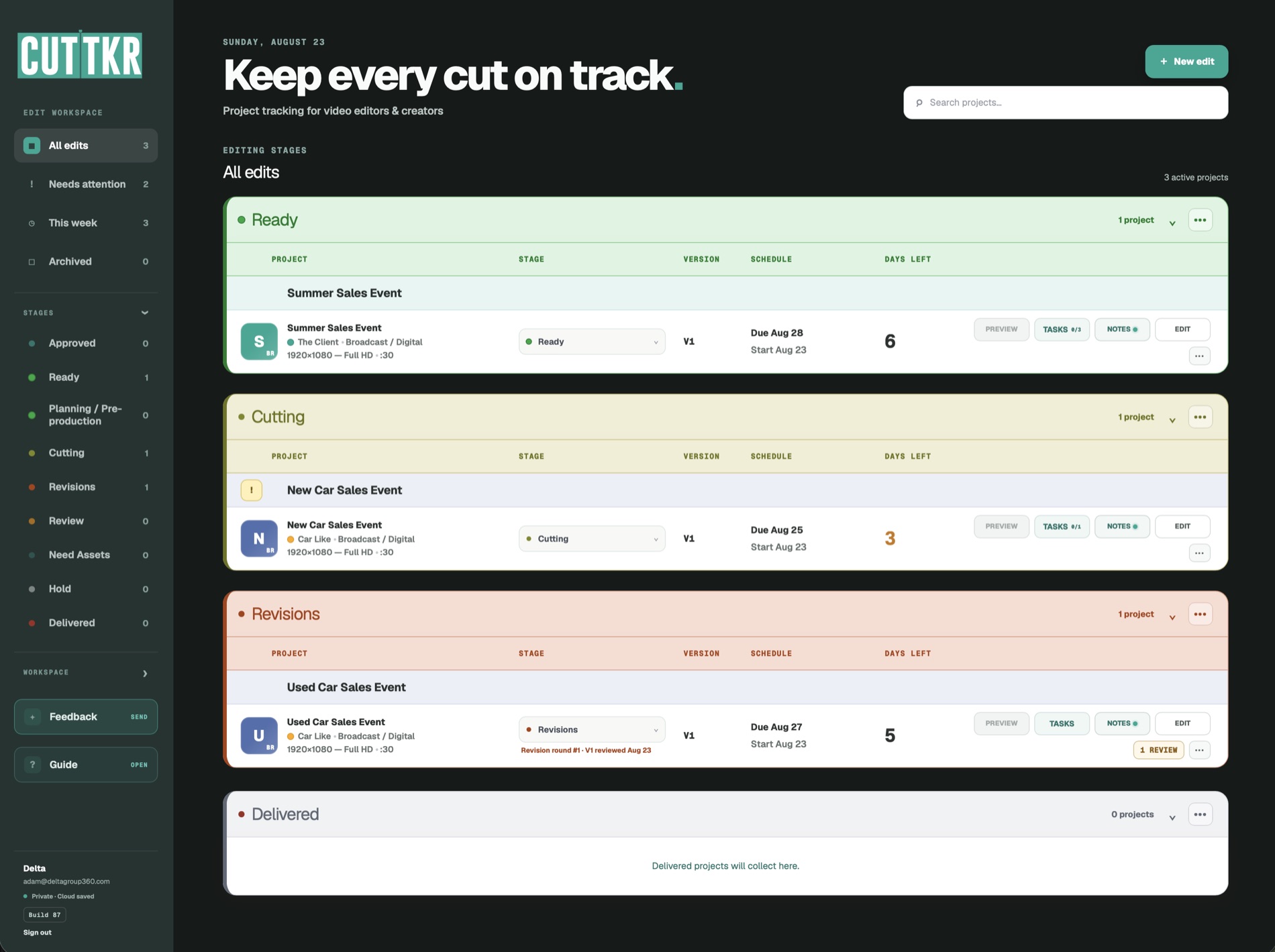
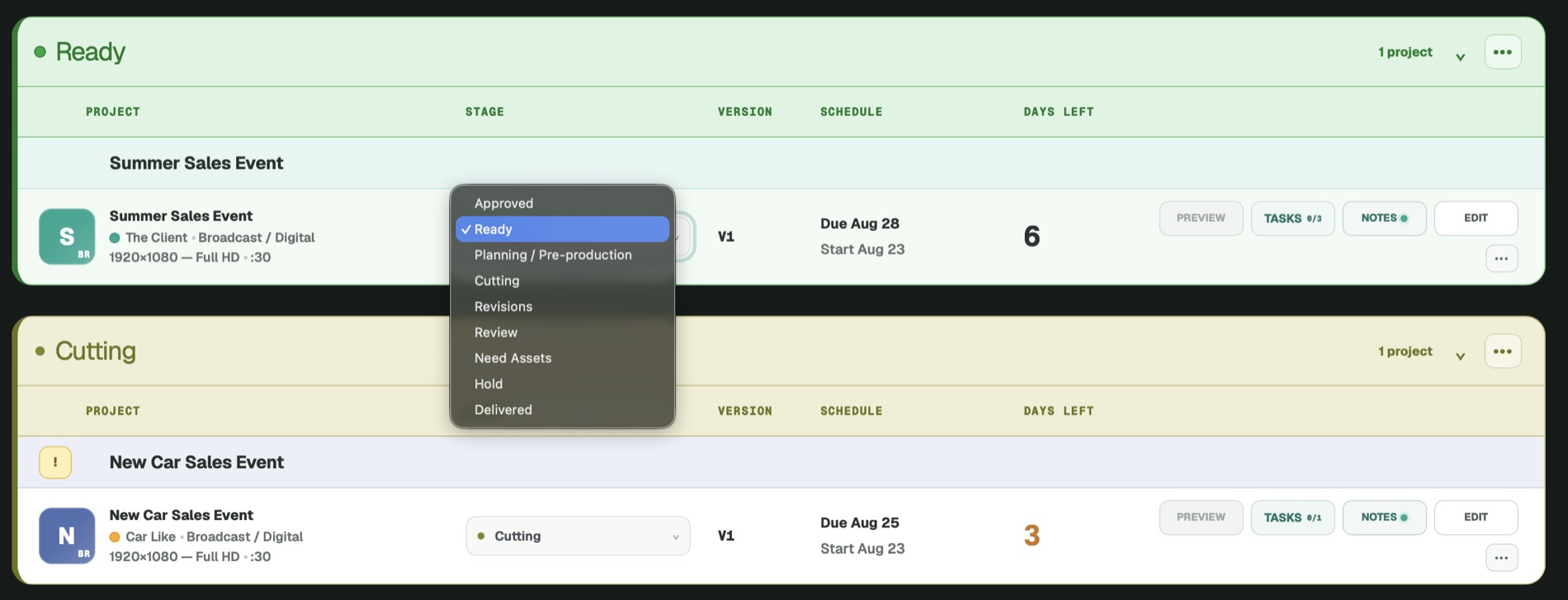
That became the foundation: a workflow that follows an edit from planning and pre-production through cutting, review, revisions, approval, finishing, and delivery. CUTTKR keeps the surrounding context connected as the project moves: tasks, review links, revision history, timelines, alternate cuts, and final deliverables.
Cut Tracker became CUTTKR
The name began with the most literal description of the idea: Cut Tracker. I shortened that to CUTTKR, which I pronounce like “cut-t-ker” when said quickly. The name reflects the purpose of the product without trying to make it sound broader than it is. This is a tracker for cuts, built by an editor who needed one.
Building it around real projects changes the product
I had experimented with building small apps before, mostly for fun. CUTTKR is the first project I have developed at this magnitude with a specific professional pain point behind it. The largest learning curve has been discovering how many connected details a useful product needs beyond the first good idea.
I am learning as I build, and I am using CUTTKR with real projects at the same time. That makes the feedback immediate. When a flow creates friction, I feel it during actual work. When I need information that is not available quickly enough, it points toward a change or a new feature. The product is not being designed around an imaginary editor. It is being tested inside the conditions that caused me to build it.
The private beta is already expanding the perspective
CUTTKR is still new, but it is no longer only my personal tool. A small group of beta users is working with it as well, and their feedback has been strongly positive. They have told me it is useful and that it has helped them keep their own work organized.
That matters because other editors will not use the system exactly as I do. Private beta testing gives me a way to learn which parts translate well, which assumptions are too personal, and what the product needs before it reaches a wider group.
I want to document the growth honestly
This is the beginning of an ongoing series about building CUTTKR. I want to share the problems that lead to new features, the choices that improve or complicate the workflow, what I learn from beta testers, and how the platform changes as more real editorial work moves through it.
The goal remains simple even as the product grows: keep editors on track through every cut, review, revision, timeline, approval, and delivery. You can learn more and join the private-beta waitlist at CUTTKR.com.
If you want to see the kind of fast-moving editing and motion-design work that created the need for CUTTKR, explore my selected work.